在QRCode內加入圖片
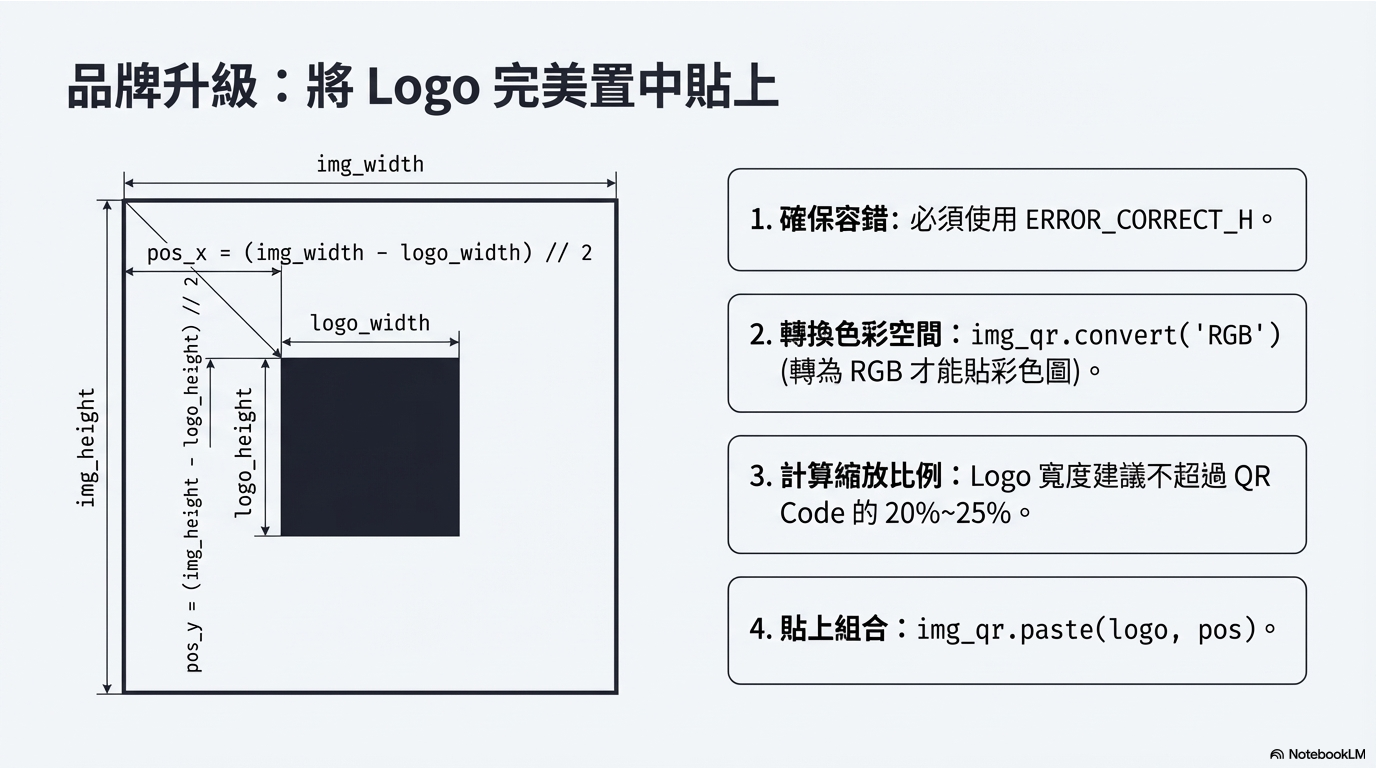
由於 QR Code 有容錯功能,所以你可以在中間加上小圖案。
from pathlib import Path

import qrcode
from PIL import Image


### 輸出資料夾
current_file = Path(__file__).resolve()  # 取得目前 Python 檔案的絕對路徑
project_root = current_file.parent.parent  # 回到專案根目錄
output_dir = project_root / "Qrcode_outputs"  # QR Code 輸出資料夾

# 若資料夾不存在則自動建立
output_dir.mkdir(parents=True, exist_ok=True)


### QR Code 資料
code_text = "搗蛋鬼別導彈"
image_name = "cat_qrcode.png"


### Logo 圖片
logo_path = project_root / "Qrcode_datasets" / "小貓拿花花.jpg"


### 建立 QR Code 物件
# version:
# QR Code 版本,範圍為 1~40
#
# error_correction:
# 容錯等級
# L:約 7%
# M:約 15%
# Q:約 25%
# H:約 30%
#
# box_size:
# 每個小方格(Module)的像素大小
#
# border:
# QR Code 四周留白(Quiet Zone)的寬度
qr = qrcode.QRCode(
    version=10,
    error_correction=qrcode.constants.ERROR_CORRECT_H,
    box_size=15,
    border=5,
)


### 加入 QR Code 資料
qr.add_data(code_text)

# fit=True 會依照資料長度,自動調整最適合的版本
qr.make(fit=True)


### 建立 QR Code 圖片
qr_image = qr.make_image(
    fill_color="#222222",
    back_color="#FFFFFF",
)

# 轉換成 RGB 格式
qr_image = qr_image.convert("RGB")


### 讀取 Logo 圖片
logo_image = Image.open(logo_path)
logo_image = logo_image.convert("RGB")


### 取得圖片尺寸
qr_width, qr_height = qr_image.size
logo_width, logo_height = logo_image.size


### 調整 Logo 大小
# Logo 大小設定為 QR Code 寬度的 25%
logo_size = (
    int(qr_width * 0.25),
    int(qr_height * 0.25),
)

logo_image = logo_image.resize(
    logo_size,
    Image.Resampling.LANCZOS,
)


### 計算 Logo 置中位置
logo_width, logo_height = logo_image.size

logo_position = (
    (qr_width - logo_width) // 2,
    (qr_height - logo_height) // 2,
)


### 將 Logo 貼到 QR Code 中央
qr_image.paste(
    logo_image,
    logo_position,
)


### 儲存 QR Code 圖片
output_file = output_dir / image_name
qr_image.save(output_file)


### 開啟 QR Code 圖片
qr_image.show()


print("Logo QR Code 已產生完成!")